Papilot
GitHub

A Cursor-like workspace
for your papers
像 Cursor 一样
改论文

Annotate and review PDFs directly, without ever touching LaTeX.直接在 PDF 上批注和审阅,完全不用碰 LaTeX。

npm install -g papilot
Get started开始使用

Works with支持 CodexClaudeAntigravity

You read and mark up the PDF the way a supervisor marks up a draft. An AI agent makes the edits in LaTeX, and every change comes back to you as a before-and-after of the typeset page. Nothing touches your paper until you accept it.你像导师批改学生的稿子一样,直接在 PDF 上阅读和批注;AI 智能体去改 LaTeX,每一处改动都以排版后修改前后的对比回到你面前。你点头之前,论文一个字都不会变。

Features功能

The PDF is the whole interfacePDF 就是全部界面

Everything you would do on paper, plus the parts paper can't do: an agent that writes the LaTeX, and Git underneath.纸上能做的,这里都能做;纸上做不到的也有:替你写 LaTeX 的智能体,和底层的 Git。

1Annotate批注

Mark up the PDF在 PDF 上批注

Select a sentence or circle an equation and say what should change. SyncTeX hands the agent the exact LaTeX lines.选中一句话或框出一个公式,写下要怎么改。SyncTeX 会把对应的 LaTeX 行准确交给智能体。

  • Notes on selected text, or on a marked region for figures and equations批注选中的文字;图和公式可以框选区域来批注
  • All your notes go to the agent as one task所有批注作为一个任务交给智能体
  • Pick the agent, its model and how hard it thinks自选智能体、模型和推理强度
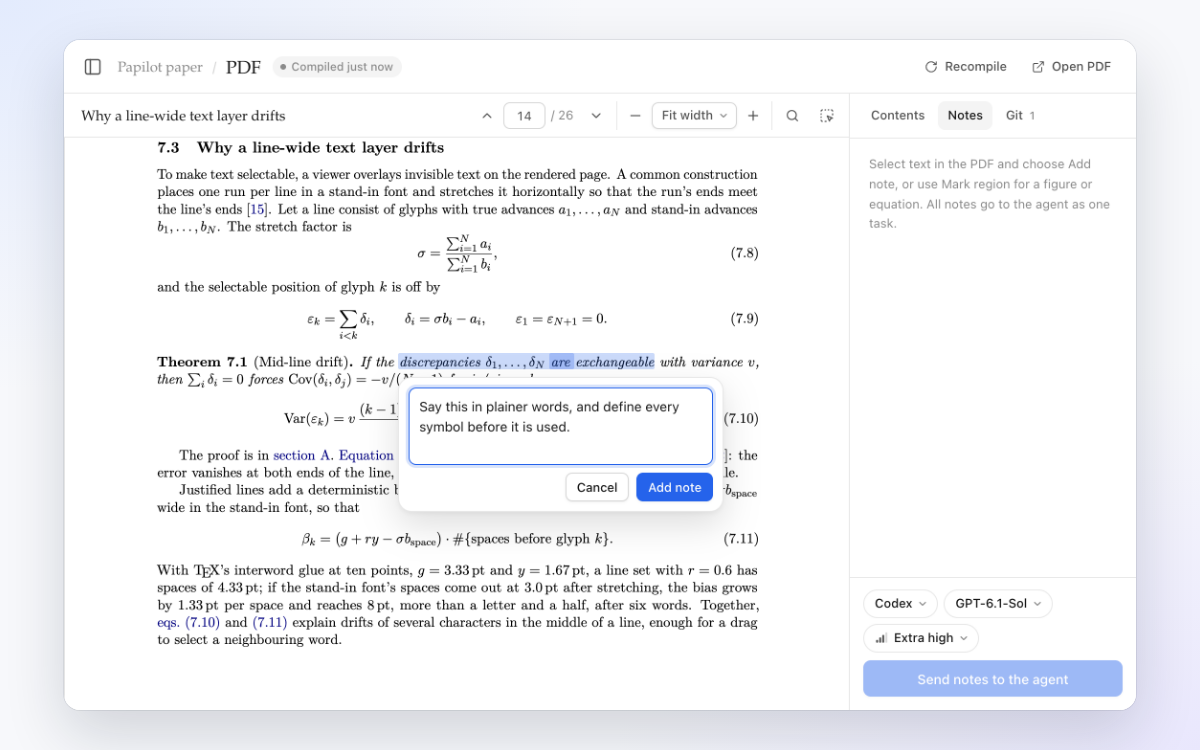
A note on a selected passage of the PDF

2Review审阅

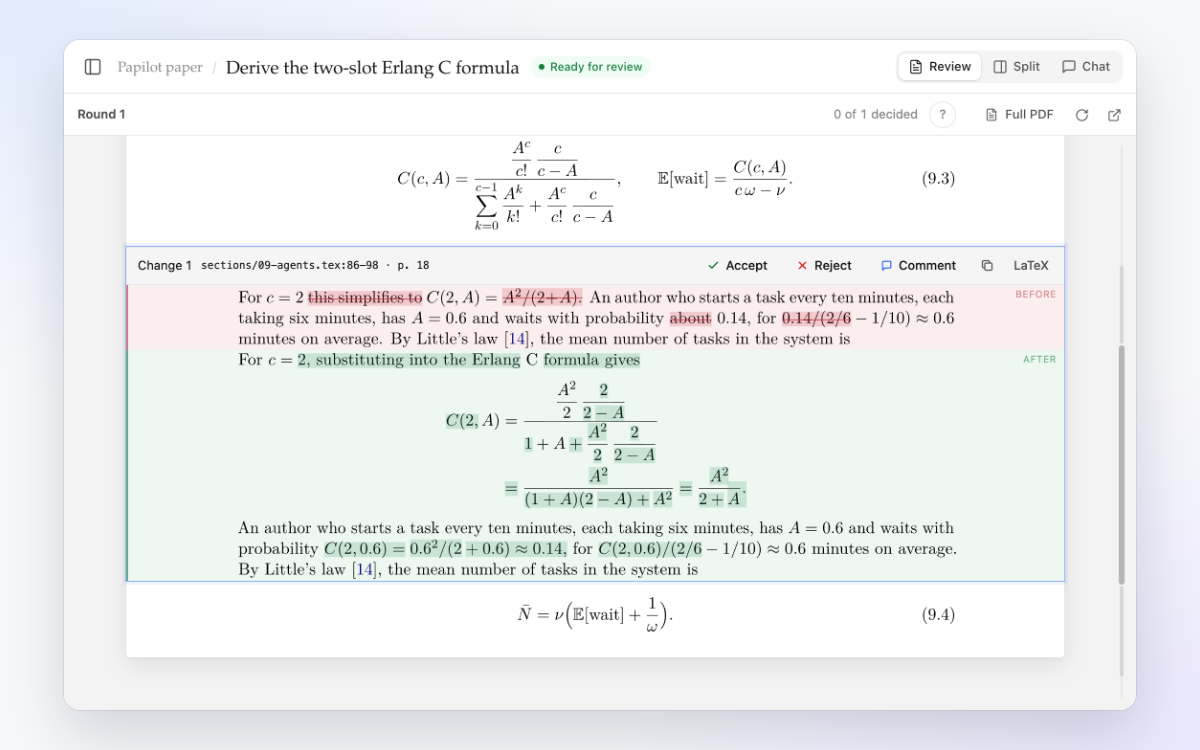
Approve change by change逐条点头

Each edit comes back as a typeset diff. Accept, reject or comment on it, and undo any decision.每处改动都以排版后的差异呈现。接受、拒绝或评论,任何决定都能撤销。

  • Before and after on the printed page, not in LaTeX source在排版后的页面上看修改前后,不用读 LaTeX 源码
  • Send your comments back for another round把评论发回去,再改一轮
  • Accept all and Reject all touch only the changes you haven't decided全部接受、全部拒绝只作用于还没决定的改动
A change shown before and after, with Accept and Reject

3Read阅读

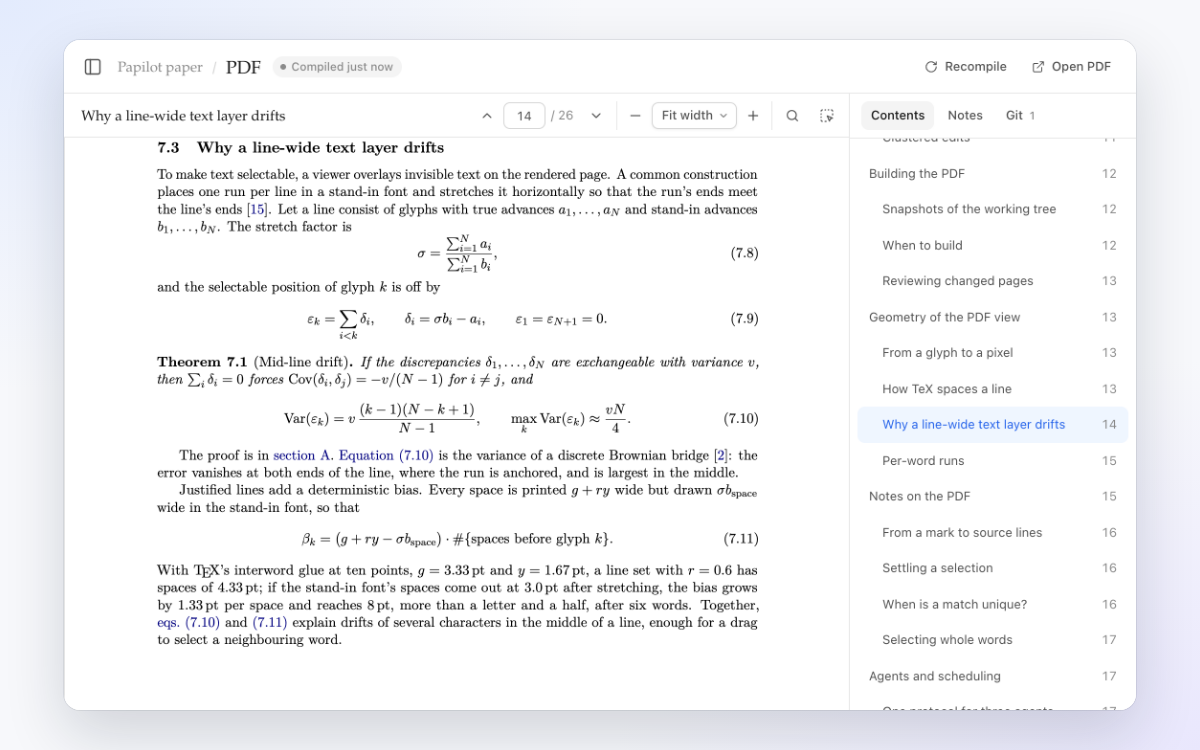
Read it like a real PDF像本地 PDF 一样阅读

Jump around with the contents menu, search every page and zoom in sharply. Selecting text picks exactly the printed words.用目录随意跳转,全文搜索,缩放清晰。选中的文字与印出的词完全对齐。

  • Contents from the PDF's own bookmarks, following the section you're in目录来自 PDF 自带的书签,并跟随你正在读的章节
  • Crisp text at any zoom, with working links and cross-references任意缩放都清晰,链接和交叉引用都能点
  • Shows the paper as it is on disk, accepted changes included显示磁盘上论文的当前状态,包括已接受的改动
The PDF viewer with its contents menu open

4Commit提交

Commit when you're happy满意了再提交

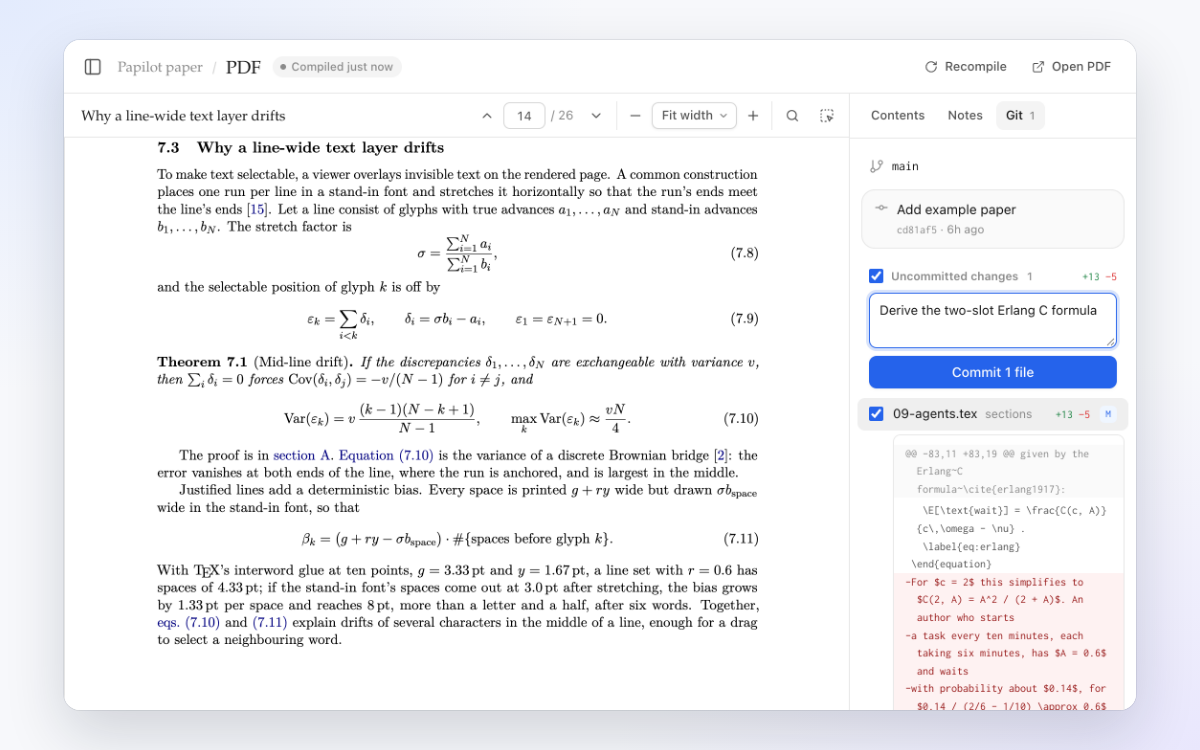
Diff files, commit the ones you choose, then pull and push without leaving the page.查看差异,只提交你勾选的文件,pull 和 push 都不用离开页面。

  • Tick exactly the files to commit; LaTeX build output starts unticked精确勾选要提交的文件;LaTeX 编译产物默认不勾选
  • Anything you staged elsewhere stays staged你在别处暂存的内容保持原样
  • Pull only fast-forwards, so nothing is merged behind your backpull 只做快进,不会背着你合并
The Git panel with a diff and a commit message

Safe by design安全设计

Your paper stays yours论文始终由你做主

A worktree for every task每个任务一个工作树

Each task edits its own Git worktree, so your manuscript changes only when you accept an edit. Two tasks run at once; the rest wait in a queue.每个任务都在自己的 Git 工作树里修改,只有你接受改动时,论文才会变。两个任务同时运行,其余排队等候。

Accept first, commit later先接受,再提交

Accepting a change updates your working tree without committing, and any decision can be undone. You decide what goes into each commit.接受改动只更新工作区,不会自动提交,任何决定都能撤销。每次提交包含什么,由你决定。

On your computer, and your phone在电脑上运行,用手机也能看

Papilot listens only on 127.0.0.1. Publish it on your tailnet with Tailscale Serve to review from a phone or tablet.Papilot 只监听 127.0.0.1。用 Tailscale Serve 把它发布到你的 tailnet,就能在手机或平板上审阅。

Your own TeX用你自己的 TeX

It builds with latexmk and the TeX distribution you already have, so your packages, BibTeX and TikZ figures work as they do today.用 latexmk 和你已经装好的 TeX 发行版编译,宏包、BibTeX 和 TikZ 图都照常工作。

Agents智能体

Bring the agent you already use用你已经在用的智能体

Choose one per task. Papilot never reads, stores or forwards your credentials, and an agent that isn't installed or signed in shows as unavailable.每个任务选一个。Papilot 从不读取、保存或转发你的凭据;没有安装或没有登录的智能体会显示为不可用。

Codex

Runs through the Codex app server, in its workspace sandbox. Papilot uses your codex if you have one, or installs it on first start.通过 Codex app server 在其工作区沙箱中运行。已装有 codex 就直接用,没有则在首次启动时自动安装。

Claude

Runs through the Claude Agent SDK, downloaded the first time. The SDK does not accept a Pro or Max subscription login.通过 Claude Agent SDK 运行,首次使用时下载。该 SDK 不接受 Pro 或 Max 订阅登录。

Antigravity

Runs agy -p, one process per turn, editing files only. If your region needs it, set PAPILOT_AGY_PROXY.运行 agy -p,每轮一个进程,只编辑文件。所在地区需要代理时,设置 PAPILOT_AGY_PROXY。

Quick start快速开始

Up and running in two commands两条命令就能跑起来

  1. Install with npm. You need Node.js 22.22+, Git and a full TeX distribution (MacTeX or TeX Live).用 npm 安装。需要 Node.js 22.22+、Git 和完整的 TeX 发行版(MacTeX 或 TeX Live)。
  2. Run the demo and open 127.0.0.1:7274. It adds a 26-page LaTeX paper about Papilot itself, full of equations, to revise.运行 demo,打开 127.0.0.1:7274。它会添加一篇讲 Papilot 本身的 26 页 LaTeX 论文供你修改,满是公式。
  3. Add your paper. Run papilot and choose Add paper for any LaTeX project in a Git repository.添加你的论文。运行 papilot,选择 Add paper,即可添加任何放在 Git 仓库里的 LaTeX 项目。
Terminal终端
$ npm install -g papilot
$ papilot demo
Example paper ready: Papilot paper (~/.papilot/example-paper)
Papilot is running at http://127.0.0.1:7274

Revise your next paper on the PDF下一篇论文,直接在 PDF 上改

Free and open source under the MIT license.基于 MIT 许可证免费开源。